

 View Cart
 sales@dataq.com
 330-668-1444
Offset Compensation Using WinDaq Software
In the real world, transducers can exhibit some initial offset. This fact often times is discovered in the field when, given the conditions of a "resting state," we expect that it will produce an output of zero volts. It is quite natural to expect a transducer to behave this way. Instead, what you may get is a transducer exhibiting some output other than zero volts. We will refer to this as offset, and it's always a constant value. Offsets can vary depending on the given conditions which we will discuss shortly. This application note will demonstrate some real world examples which require compensation. Next, we will explore the approach we can take to account for nonzero offsets using WinDaq software.
Offset Compensation Examples
Compensating for offsets is one of the keys to achieving proper measurements. Offsets can occur for several reasons. Two of which are very common and are emphasized here: 1) offsets due to the inherent characteristics of the transducer itself, and 2) offsets due to the initial test conditions. There are many different transducers on the market, all of which are used in a wide variety of situations. As a starting point, use the transducer and begin to get a feel for it's characteristics, particularly at "rest. We will give some examples next which will illustrate the need to calibrate, given the two conditions mentioned above.
As our first example, we will use a pressure transducer with an inherent offset. For purposes of this example, our transducer will have a pressure range from 2-20,000 psi. It outputs 4-20mA over this range. Using a 250 ohm shunt resistor, we will convert this transducer output to a 1-5 volt signal. The first thing to realize is this transducer will never output zero volts at rest but instead will output 1 volt - representing 2 psi. If you mistakenly calibrated 0 volts = 0 psi, all of your readings would be off by about 20%! This would prove to be particularly troublesome in any attempt to make an accurate measurement.
Consider a 2nd example: you are using a load cell to measure the gross weight of trucks at a weigh station. The load cell measures 0 to 50,000 lbs. It requires an excitation voltage of 10 volts to produce an output of 30mV, which represents 50,000 lbs. Herein lies the problem for this particular example. The transducer is not expected to go to zero volts because a steel plate covers the sensor, allowing the truck's weight to be more evenly distributed over it. This example falls into the second category mentioned above. Further, for the sake of our example, let's arbitrarily assign a weight to this plate of say 2,000 lbs for purposes of illustration. What happens to your measurements if you don't account for this offset? Your readings would be offset by 2000 lbs! No problem, we would simply apply compensation to correct this offset as would be done in the case with the pressure transducer example above. Before we discuss how to do it, let's look at one more example where it may be encountered.
As our final example, consider a displacement transducer (LVDT - linear variable displacement transducer). It happens that a typical transducer of this type will exhibit some initial condition offset. In this example, the displacement transducer will not start out at zero inches. Consider a stamping machine that could be used in an industrial plant. With the machine shut down, the stamping mechanism might be fully retracted to allow for retooling or for some other purpose. We can define this state to be the "zero point" (no displacement). Upon starting the machine, this stamping mechanism will now move to some "ready state," displaced several inches from the fully retracted "zero point." This new position is the normal state from which we would like to begin our measurements. In this example, the purpose of having an LVDT connected is to measure the displacement distance the stamping mechanism travels during the stamping process. At the "ready state," the LVDT has already moved several inches from it's initial "zero point." WinDaq software can be calibrated to take this offset into account. We will explore this method using WinDaq software.
Factoring In Offset
Let's return to our pressure transducer example above. We know from our previous discussion that this device cannot reach 0 psi, nor does it reach 0 volts. We have a method available allowing us to account for this with relative ease.
To minimize offset using WinDaq software in the above example, do the following. Select Engineering Unit Settings from the Edit pull-down menu. Enter "1" for Low Level, Volts and "2" for Low Level, EU. For Upper Level, Volts enter "5" and for Upper Level, EU enter "20000". Finally, enter "psi" as the EU Tag.
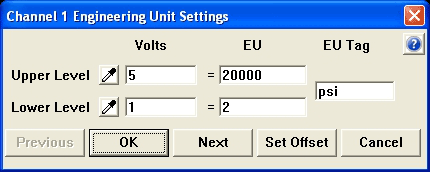
Upon completing this procedure, the software will be scaled to the offset condition, WinDaq will display "psi" instead of volts, and you're ready to record. Furthermore, this scaling information will accompany your data file (it gets stored in the data file header). So when your data file is reviewed with WinDaq Waveform Browser playback and analysis software, the scaling information is still there, thus preventing you from having to re-scale. Even if you did not calibrate before recording your data, the flexibility of WinDaq Waveform Browser software allows a second chance for scaling while reviewing and analyzing your data file. Either way, both recording and playback software packages utilize the same scaling options.
Our purpose here was to demonstrate that WinDaq software can be a powerful tool to help you deal with offsets. It is also relevant to mention that other factors, such as temperature and fatigue, can be accounted for with WinDaq software. Although factors such as these may play a lesser role in the make up of a offset, it may be necessary to take them into account in applications that require high accuracy. It is up to you to decide how important these issues are. You should consult the manufacturer's data sheet to get a feel for how your transducer(s) can respond given changes in ambient temperature, or stress induced fatigue, or whatever the concern.
To recap, be sure to properly account for offsets by factoring in the initial state of your transducer before you begin recording. This includes taking into account what the transducer itself outputs with no input applied (inherent offset) and what it outputs due to the conditions present at the start of your test (initial conditions offset). If you take the time to familiarize yourself with your transducer and WinDaq software, you will find you have the tools needed to assure accurate measurements.