

 View Cart
 sales@dataq.com
 330-668-1444
 WinDaq/MySQL and WinDaq/MSSQL
WinDaq Real Time Link to MySQL or Microsoft SQL Database
For use with all DATAQ Hardware that runs with WinDaq Software
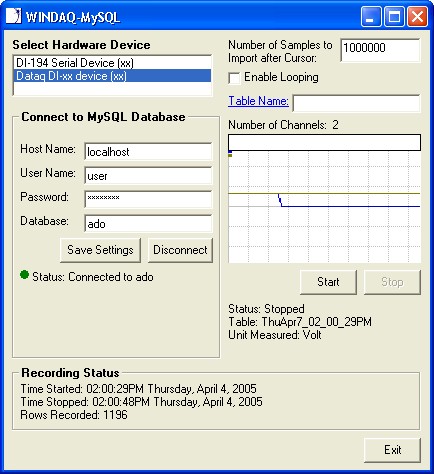
- FREE Visual Basic program that allows you to utilize the power and speed of a MySQL or MS SQL Database to store data
- SQL can store over 30,000 times the amount of data that Microsoft Excel holds
- Connect to MySQL at Local or Remote Location
- Works with MySQL running on either Linux or Windows
- True Multitasking Operation
- Single-Shot or Looping Real-Time Modes
- Learn More: Read the article How to Store Data using WinDaq/MySQL
This software is a free download without any warranty. No help documentation is included. If you have questions, want to report a problem, or need support, please create a ticket online.
Requirements
- DATAQ Instruments Hardware Device
- WinDaq Software running on Windows OS
- You must have or upgrade to at least version 2.5 of the WinDaq program you are using (Lite/Pro/Pro+)
- MySQL Requirements
- MySQL database that is running on either a Windows or Linux machine. For more information go to www.mysql.com
- MySQL Connector/ODBC. To download, go to: https://dev.mysql.com/downloads/connector/odbc/3.51.html. For information on how to Install the ODBC connector, click here.
- Microsoft SQL Requirements
MS SQL database server.
Download Links
WinDaq/MySQL. WinDaq real time link to MySQL Database (FREE). Includes Visual Basic 6.0 source code and WinDaq/MySQL program. Download Now!
WinDaq/MSSQL. WinDaq real time link to Microsoft SQL Database (FREE). Download Now!
Product Highlights
Many data acquisition and analysis applications need to store large quantities of data that can be retrieved quickly and easily. WinDaq/MySQL and WinDaq/MSSQL are free Visual Basic software programs for WinDaq/Lite, /Pro, and /Pro+ that allow data acquired by these packages to be ported to a SQL database. WinDaq software performance is unaffected by the WinDaq/SQL process.
Who should use this?
- Those looking for a free solution to storing data outside of the WinDaq format.
- Those who need to store large quantities of data.
- Those who are familiar with the MySQL or MSSQL database format.
| Features | Benefits |
| FREE | WinDaq/MySQL and WinDaq/MSSQL are free Visual Basic 6.0 programs for use with WinDaq software. |
| Powerful Recording Capability | Record over 2,000,000,000 rows of data in a single MySQL table. Leave WinDaq/MySQL running for as long as you want, and then search quickly and easily though the data using the speed of MySQL. |
| Real-time waveform data port to MySQL or MS SQL in real time | Extends the analytical reach of WinDaq by providing a solution for calculated channels using the most popular SQL databases available. |
| Single-shot or Looping real-time modes | Allows WinDaq/MySQL to acquire a single scan of all enabled channels, or continuously loop through a definable number of rows. |
| No Programming Required | You can use the program as-is to record data in real-time to a MySQL or MSSQL database. |
Read the quick start guide to learn more: How to Store Data using WinDaq/MySQL.
Install MySQL Connector/ODBC
- Download the MySQL Connector/ODBC from www.mysql.com. To download, go to: https://dev.mysql.com/downloads/connector/odbc/3.51.html. Look under Windows, Driver Installer. This connector will allow you to connect to a MySQL Database from Visual Basic. Note: This program does not work with ODBC driver 3.5.1.10. If you currently have this driver, please upgrade to 3.5.1.11 or later.
- After you have successfully installed the driver, from the Control Panel on your computer, open up the ODBC Data Source Administrator.
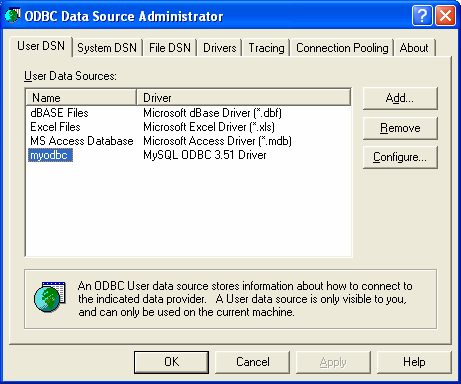
- Click "Add..."
- Select the MySQL ODBC 3.51 Driver. Now just follow the prompts to finish.