 View Cart
 sales@dataq.com
 330-668-1444
DATAQ Instruments Developer Network
Access Resources
 |
|
 |
Need Help? Download the ActiveX Help file or post a question to the Developer Support Forum. |
How do I add DATAQ ActiveX controls to my Access 2003 database?
STEP 1: Insert a Macro, Module, Form, etc. into your database project.
Click Insert>>Module or click Insert>>Form
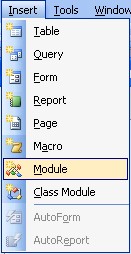
If you insert a module, the Visual Basic Editor will automatically open and you can begin writing custom code into the module.
If you insert a form and choose Design Mode, you can design your form in the same window as your database.
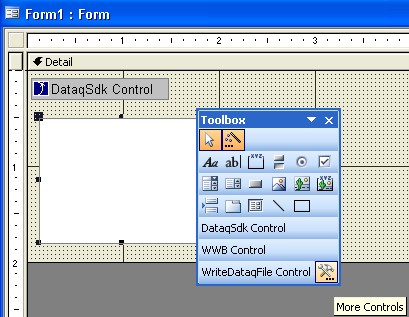
STEP 2: From the Form, add the DATAQ ActiveX controls to your project by clicking the More Controls button in the toolbox (see above). To add the controls into the toolbox for later use, right click inside the toolbox and click Customize.
OR
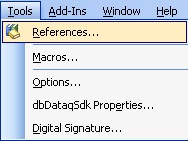
In the Visual Basic Editor, click Tools>>References
From the References window, put a check mark next to the DATAQ ActiveX Components that you want to include in your project (DataqSdk, DataqSerial, DQChart, ReadDataqFile, WinDaq, WriteDataqFile, WWB), click OK. If the DATAQ controls do not appear in the References box, you can Browse for them in the C:\WINDOWS\SYSTEM32\ folder. ActiveX Controls have a .ocx extension.