

 View Cart
 sales@dataq.com
 330-668-1444
DATAQ Instruments Developer Network
Open Database Connectivity (ODBC)
 |
|
 |
Need Help? Download the ActiveX Help file or post a question to the Developer Support Forum. |
How can I use the ODBC Text Driver with WinDaq?
The Microsoft ODBC Text Driver can be used to collect data from a WinDaq file that has been converted to text or .csv.
The benefits of using the ODBC Text Driver are:
- Use standard SQL statements to query your data quickly.
- When you use ODBC, the DATAQ ActiveX controls are NOT necessary.
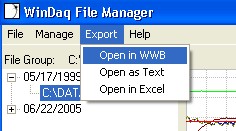 Follow the two easy steps below to learn how to use the ODBC Text Driver with WinDaq:
STEP 1: Convert your WinDaq (.wdq) files to .csv from the WWB or to .txt with the WinDaq File Manager.
The WinDaq File Manager is a free, ready to use add-on program that allows the user to organize WinDaq files and open them in the WWB or export to a .txt or .xls file. Click here to download the WinDaq File Manager.
STEP 2: Download the dataqODBC Visual Basic 6.0 example program to learn how to connect to the ODBC and fill your data into a searchable record set. To download the dataqODBC example program, go to: support.dataq.com/viewtopic.php?f=31&t=2568
Connection String:
"Driver={Microsoft Text Driver (*.txt; *.csv)};Dbq=c:\txtFilesFolder\; Extensions=csv;"