|

Click Here
|
|
WinDaq Add-ons and Utilities
Add-ons | Utilities
|
|
|
|
|
|
|
|
|
|
|
|
|
|
|

WinDaq/SQL
Port data in real time from WinDaq to a MySQL or MSSQL database. FREE download. Click here to learn more. |
|
|
|
|
|
|
|
|
|
|
|
|
|
|
|
|
|
|
|
|
|
|
|

WinDaq/XL
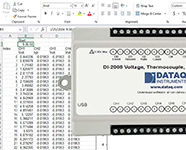
This WinDaq Software data acquisition add-on allows you to port acquired data directly into an Excel Spreadsheet in real time. 60-day Trial Version available. |
|
|
|
|
|
|
|
|
|
|
|
|
|
|
|
|
|
|
|
|
|
|
|

DataqSDK Linux Package
Free C++ Software Developers Kit for use with the DI-194RS and DI-154RS Starter Kit devices. Click here to learn more... |
|
|
|
|
|
|
|
|
|
|
|
|
|
|
|
|
|
|
|
|
|
|
|

Want to learn how to program? We recommend starting with Visual Basic 6.0. "Teach Yourself Visual Basic 6 in 24 Hours": In just 24 sessions of one hour or less, you will be up and running. Only $29.99. Click here to purchase |
|
|
|
|
|
|
|
|
|
|
|
|
|
|
Starting with Revision 3.16, WinDaq Acquisition software can integrate 3rd party add-ons to its functionality. For the latest version of WinDaq please see the Upgrades page. Note: Upgrades in WinDaq/Pro or Pro+ may require you to purchase a key. Feel free to download any or all of the self-extracting programs listed below. For instructions on incorporating your own add-on see our instructions page.
Visit the DATAQ Developer Network to learn how to create your own programs and for example programs in Visual Basic, LabView, C++, Visual Studio.NET and more.
Add-ons
Some of the following programs are contributed by 3rd party entities - DATAQ Instruments does not provide any warranty or support.
The WinDaq Add-on package from DATAQ Instruments includes the following programs:
- WinDaq/XY Viewer (ID=2)
This program allows you to generate a multiple channel XY plot in real time. It "eavesdrops" on the data that is being acquired and simultaneously generates an XY plot of this very same data.
- WinDaq Meter and Alarm (ID=1)
This program reports waveform data values in a digital meter-type display format. When enabled, alarms can be generated when signal passes high/low limits.
- WinDaq Timer (ID=4)
A program features one "on" interval (recording) and one "off" interval (non-recording), which can be set for any length of time.
- WinDaq/XL (ID=5)
An add-on that allows acquired data to be ported to a Microsoft Excel spreadsheet. This is an extra-cost option. See the product page for more information.
The WinDaq Add-on package from Ultimaserial includes the following programs:
- Spectrogram (ID=7003)
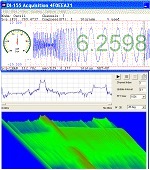
A program to study the frequency spectrum in real-time, with 3D color-scaled waterfall spectrum display. VB source included.
- FFT (ID=7001)
Provides Real-time 1024-point FFT power spectrum for frequency study. VB source included.
- Derivative (ID=7004)
Generate 2-point derivative output on a specified channel. VB source included.
- AnalogOutput (ID=7005)
Control output via the DAC of the device, including DI158/720/730/722/740, while WinDaq is running. VB source included.
- DigitalOutput (ID=7006)
Control output via the digital output ports of the device, including DI148/158/710/715/718BX/720/730/722/740, while WinDaq is running. VB source included.
Other Add-ons from DATAQ Instruments:
WinDaq to MATLAB Add-on (ID=6) This add-on allows the user to port acquired data from WinDaq directly into a MatLab array and then save the array for future analysis.
Utilities
The following utilities are mainly user contributed, and DATAQ Instruments does not provide a warranty or any support. Utilities cannot be entered into or spawned from the WinDaq Acquisition menu.
- WinDaq/XY Viewer For Previously Recorded Data
This program allows you to generate a multiple channel XY plot from an existing data file. It requires the GE Mining Division version of WinDaq Waveform Browser playback and analysis software. If you do not have this special version of WinDaq Waveform Browser, download it now. This is what customers are saying about this excellent, free XY plotting program:
- "I am very happy with what I have. It works better than the $15,000 XY recorders on the market, plus it has a lot more features."
— S.S., Testek, Inc.
- WinDaq Histogram (125Kb)
This program displays a WinDaq Waveform Browser channel in a histogram format (16 to 4096 bins). It requires WinDaq Waveform Browser playback and analysis software.
- Histogram (43Kb)
A Visual C program that is identical to the WinDaq Histogram program described above, but this one contains source code.
- WinDaq Info (39Kb)
A "C" program that demonstrates how to extract useful information from a WinDaq Waveform Browser file. Header file elements such as number of channels and per channel elements such as scaling, offset, engineering units, gain, and range can be determined. This program is a good starting point to understanding the CODAS data file format.
- Wdq2Wav contributed by Kevin M. Rosenberg
Wdq2Wav extracts a channel from a WinDaq file and produces a .wav file. If the command line parameters of the windaq-file, channel-number, and wav-file are not given, then the program will prompt the user to enter those values when the program is run. Click here for more information
- Wdq2Wav contributed by www.ultimaserial.com
A Visual BASIC program that extracts a specified channel from WinDaq file and convert it to a sound (.WAV) file so that you can play it back through a speaker or use the Spectrogram from Audio Spectrum Analysis to analyze the waveform.
- Seismic Programs contributed by Bob McClure
- WinDaq Real Time FFT contributed by Bob McClure
This VisualBasic6 program 512 point FFTs. The bottom panel displays the spectrum, in uncalibrated decibels, ranging from near dc to half the sampling rate.
For support please send mail to support@dataq.com.
|