

 View Cart
 sales@dataq.com
 330-668-1444
 RSS Feeds


Microsoft Excel automatically assigns a date/time format to files generated by the DI-160 Event, State and Count data logger that does not include seconds (mm/dd/yyyy, hh:mm). As a result, events that occur more often than once a second appear in the data file with the same date/time stamp. While seconds are recorded, they simply aren’t displayed. Rather than reformatting individual data files one step at a time, here’s how to record a macro in Microsoft Excel that will streamline the process.
The date/time format in a DI-160 Event Data Logger data file does not by default display seconds: 7/14/2011 11:38
Create a macro in Microsoft Excel to display seconds in the date/time column:
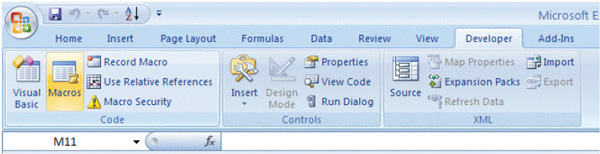
- In the Developers tab in Excel click on Record Macro.
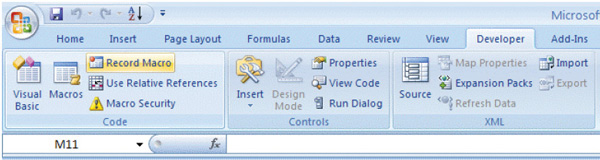
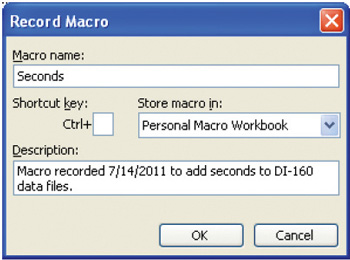
- Name the macro, add a description, store it in the Personal Macro Workbook for future use and click OK.
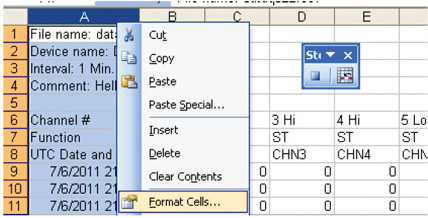
- With the macro recorder now running, right-click on column A (the date/time column) and choose Format Cells.
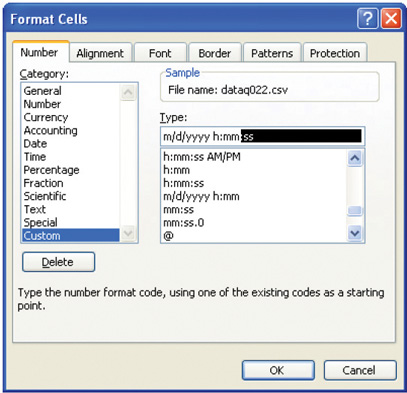
- In the Format Cells dialog box, choose the Custom category. Select the default date/time format (m/d/yyyy h:mm), add seconds (:ss) and click OK.
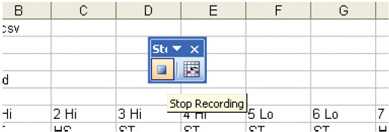
- Finally, click the macro Stop button.
Once a DI-160 Event Data Logger data file is recorded you can open it in Excel, click on Macros in the Developer tab, and select and run the newly created macro.
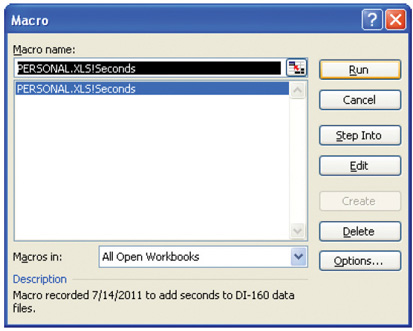
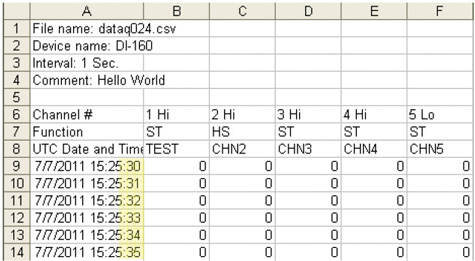
The date/time column now includes seconds:
Go to the DI-160 Event Data Logger product page to learn more.
Follow Us


 Categories:
  Tags:
Tags: 

