 View Cart
 sales@dataq.com
 330-668-1444
WinDaq/XL
WinDaq-to-Excel Real Time Link
Select Delivery Option:
Stock

- For new project, please consider ExcelLink, which supports both 32 and 64-bit Excel
- Click Here to download the software (unlock code for full version may take at least one business day to process)
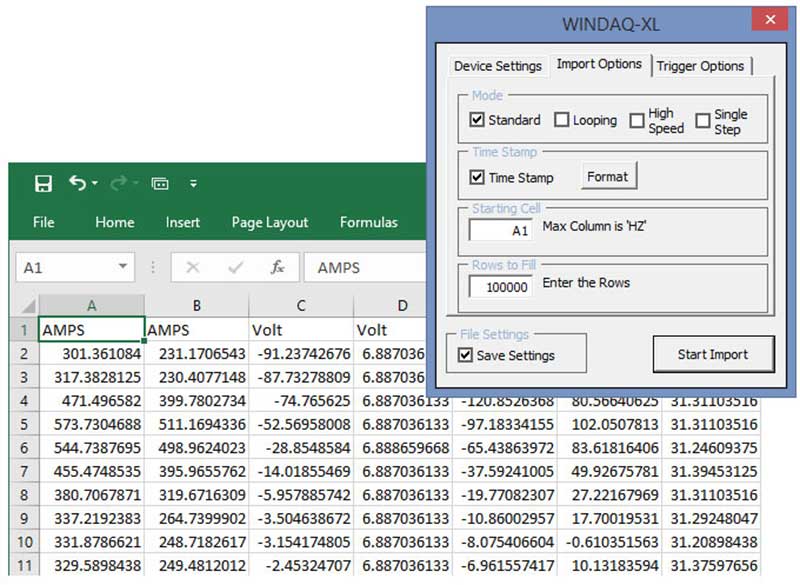
- Real time data logging directly to Microsoft Excel
- Compatible with MS Office 2003 or higher - Excel MUST be installed as 32-bit version
- Computer Time Stamp field
- Trigger Options
- "Run WinDaq Minimized" function
- True Multitasking Operation
- No programming
- Single-Shot or Looping Real-Time Modes
- Trigger Mode Support for High-Speed Snapshots
- Instant Export from the Playback Software.
 Share
Share


WinDaq/XL WinDaq Add-on
Learn how WinDaq/XL is used to stream data from WinDaq data acquisition software directly into Microsoft Excel in real time.
Description
WinDaq/XL is a program that bridges WinDaq software with Excel. Using the WinDaq/XL software will allow you to use your Excel program to analyze WinDaq data in real time by taking WinDaq waveform data and moving it directly to a user-selected range of cells in Excel.
Note: WinDaq/XL is an add-in program to WinDaq Software and requires WinDaq Acquisition to be running in order to stream data to Excel (unless importing data through the WinDaq Waveform Browser). To stream data in multiple instances (devices) you must run WinDaq with the first device then start WinDaq/XL; run WinDaq with the second device then start WinDaq/XL; etc.


Related Software
WinDaq
Data Acquisition Recording and Playback Software
Included FREE with your Dataq Hardware purchase. Installs drivers and WinDaq recording and playback software. Includes optional Add-on software with a valid installation key.
WinDaq Playback
Playback Only Download
Free WinDaq Waveform Browser Playback software. Allows you to view data files recorded with WinDaq Acquisition software (this software is included in the main WinDaq installation).
Advanced CODAS
$595
Advanced analysis software add-on to WinDaq Waveform Browser software. Allows calculated channels, derivative, integration, moving average, automatic file management, automatic scaling, and more.
WDQ to TDM
File Conversion
Free file conversion utility for WDQ and TDM files.
WinDaq/MySQL
Real Time Link
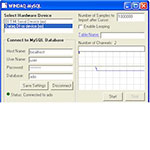
Free Visual Basic program that allows you to utilize the power and speed of a MySQL Database to store data from WinDaq.
WinDaq/MSSQL
Real Time Link
Free Visual Basic program that allows you to utilize the power and speed of a MS SQL Database to store data from WinDaq.
WinDaq UtilityPack
Tools
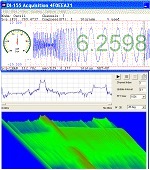
WinDaq UtilityPack adds powerful tools to WinDaq acquisition software, such as live FFT, Spectrogram, Meter, Gauge and Smart Digital Outputs, which can be launched automatically when WinDaq starts
Specifications
| Hardware and Software Requirements: | WinDaq Data Acquisition and Playback Software 32-bit Version of Excel |
How do I Control WinDaq/XL from VBA?
It is possible to Start and Stop WinDaq/XL and control some of the import options from Visual Basic for Applications (VBA) in Microsoft Excel.
Step 1: Add WinDaqXLVBA Add-In as a Reference to your VBA project.
Go to Tools>>References and put a check mark next to WinDaqXLVBA.
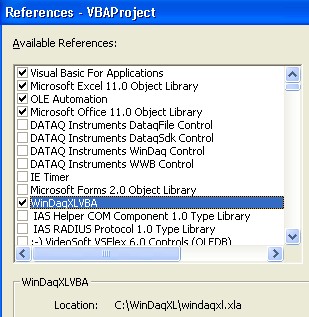
If WinDaqXLVBA does not appear as an available reference you may have to browse for the windaqxl.vba file. Click Browse, then go to C:\WinDaqXL folder, select windaqxl.vba. You will need to Browse for all file types to see the .xla file.
Please Note: WinDaq/XL Version 1.60 or greater is needed. Click here to download the latest version.
Step 2: Use WinDaqXLVBA functions from Excel VBA in your custom program. If you need access to a WinDaq/XL feature that is not listed below, submit a ticket online.
| VBA Syntax | Description |
| WinDaqXLVBA.StartRecording | Start Recording using the settings from the last import. NOTE: If used from a custom form, the form must be hidden before the import will start. |
| WinDaqXLVBA.StopRecording | Stop Recording |
| WinDaqXLVBA.ShowSetUpForm | Display the set-up form to define WinDaq/XL settings. |
| WinDaqXLVBA.SelectStartCell(StartCell As String) | Select the Starting Cell. |
| WinDaqXLVBA.SelectRowsToFill(RowsToFill As String) | Select the number of Rows to Fill. |
| WinDaqXLVBA.TimeStampEnabled(TimeStamp As Boolean) | Enable or disable the Time Stamp feature. True = enabled, False = disabled. |
| WinDaqXLVBA.TriggerImportEnabled(TriggeredImport As Boolean) | Enable or disable the Triggered Import feature. True = enabled, False = disabled. NOTE: This feature must be enabled to use the other trigger options. |
| WinDaqXLVBA.TriggerAutoReArmEnabled(AutoReArm As Boolean) | Enable or disable the Triggered Auto-ReArm feature. True = enabled, False = disabled. |
| WinDaqXLVBA.TriggerChannels(Chn1 As String, Chn2 As String, Chn3 As String, Chn4 As String) | Set up to 4 channels for applying trigger values. Channel designations for triggers 2-4 are optional. |
| WinDaqXLVBA.TriggerOperator | Select the operator for each channel with a trigger value. Possible operators are =, >, <, <=, >= |
| WinDaqXLVBA.TriggerValues | Select the trigger value for each channel that is set-up. |
| WinDaqXLVBA.TriggerAndOr | Set up to 3 AND/OR operators to add multiple trigger values. |
Step 3: Write your custom VBA code. Below is example code of how to use some of the WinDaqXLVBA functions.
Sub ControlWinDaqXL()

   WinDaqXLVBA.SelectStartCell ("A5")

   WinDaqXLVBA.SelectRowsToFill ("10")

   WinDaqXLVBA.TimeStampEnabled (True)

   WinDaqXLVBA.TriggerImportEnabled (True)

   WinDaqXLVBA.TriggerChannels 1, 2

   WinDaqXLVBA.TriggerOperator "<", ">"

   WinDaqXLVBA.TriggerValues "0.3", "0.002"

   WinDaqXLVBA.StartRecording

End Sub
Articles
WinDaq/XL and Graphics Acceleration Crashing WinDaq
Data Acquisition in Microsoft Excel—How to Import Recorded Data
Clutch Testing with Data Acquisition Products
Getting Started with WinDaq/XL
ActiveX Controls for Data Acquisition Applications
Hardware Device not listed in the "Select the WinDaq Device" box
Videos
WinDaq/XL
Learn how WinDaq/XL is used to stream data from WinDaq data acquisition software directly into Microsoft Excel in real time.