


 View Cart
 sales@dataq.com
 330-668-1444
 RSS Feeds


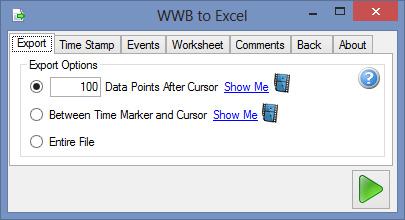
Ask customers what they want to do with acquired data, and the vast majority answer, “Take it to Excel.” Although our WinDaq Playback software has always supported an Excel-compatible CSV export option, the process was cumbersome and not very flexible. We fixed that.
DATAQ Instruments is proud to announce the beta release of a new built-in utility to WinDaq Waveform Browser called “WWB to Excel.” The Export-to-Excel utility is easily accessible via the File menu. It’s simple to use and offers some great features for data export and format including precise data selection with the time marker and cursor, time stamp options for relative time as well as local time, event marker options, workbook and worksheet names and files, start cell declaration, user annotation, comments, engineering units, and sample rate.
The utility doesn’t just run in the background and spit out a saved file – it works in real time and provides a back button that allows you to change any of your export options. There are no secondary files. The export utility opens Excel and you save the file from Excel when you are happy with the export data.
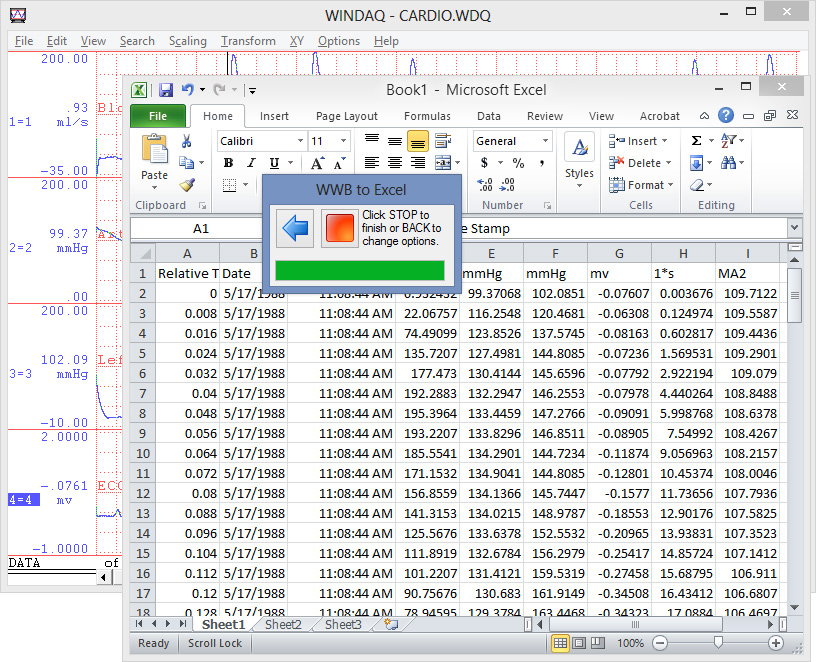
Download it, take it for a test drive, and let us know what you think in the comments below. Compatibility is Microsoft Excel 2003 and up. WinDaq Waveform Browser is free software.

Download WinDaq Waveform Browser
Learn more about WinDaq Waveform Browser
Follow Us


 Categories:
  Tags:
Tags: 


2 Comments
George Bynum
I’ve used the standard method successfully for years, and it looks like a feature I frequently use is missing … export visible channels only.
Of far less significance is the capability to output a portion of the compressed file … used IN MY CASE, only by my mistake.
I have not upgraded MS Office since 2000 so it won’t run on my system; I may try it on my wife’s system with the most current version.
Richard Larimore
The export to Excel direct feature does work well for moving a trigger event of a few thousand lines of data. It is faster than going to a CSV file. However, I routinely deal with 100+ meg WDQ files. I must manually create 5 to 15 separate CSV files to keep their length to less than the Excel max row limitation. What I need is a Windaq browser that can take a big WDQ file and automatically create multiple CSV files containing all the data that can be opened by Excel. I have already created VB code in Excel to automatically process the data in each CSV file in the proper order.